示例
实况演示画廊
Section titled “实况演示画廊”以下每个示例都作为独立页面运行于 demo.webcomponent.io ↗,这是一个实况画廊, 每个演示旁都附有对应源码。
| 演示 | 展示内容 |
|---|---|
| 布尔 props ↗ | 存在/不存在反射、toggleAttribute、[flag] 选择器 |
| 自定义属性转换器 ↗ | 针对 Date 和数组 props 的 toAttribute/fromAttribute |
| Props 蓝图 ↗ | static props 作为默认值与类型的唯一真源 |
| Prop 类型强制 ↗ | static strictProps 以及“记录日志而非抛出”的默认行为 |
| 编译期 prop 类型 ↗ | 在 TypeScript 中为 this.props 添加类型 |
| 带类型的 props ↗ | 属性往返转换恢复所声明的类型 |
| 模板化 ↗ | 字符串渲染与 html 标签模板渲染的对比 |
| 渲染协调 ↗ | 原地 patch 保留焦点、光标和输入状态 |
| 样式对象 ↗ | 通过 style prop 实现计算型和条件式样式 |
| Shadow DOM ↗ | static shadowRootInit |
| 可构造样式 ↗ | static styles,包括组合多个样式表 |
| 生命周期顺序 ↗ | 每个钩子触发时都会被记录 |
| 属性生命周期 ↗ | 属性变化如何驱动各钩子 |
| onChanges 载荷 ↗ | 驼峰式 property 与短横线式 attribute 的对比 |
| 只使用部分能力 ↗ | 在不使用基类的情况下使用 html/createElement |
| 综合功能演示 ↗ | 多项功能组合在一起 |
| 单文件 pen ↗ | 在一个 HTML 文件中实现计数器与开关 |
CodePen 示例
Section titled “CodePen 示例”1. 待办事项应用
Section titled “1. 待办事项应用”一个可以添加/完成任务的简单应用: 在 CodePen 上查看 ↗
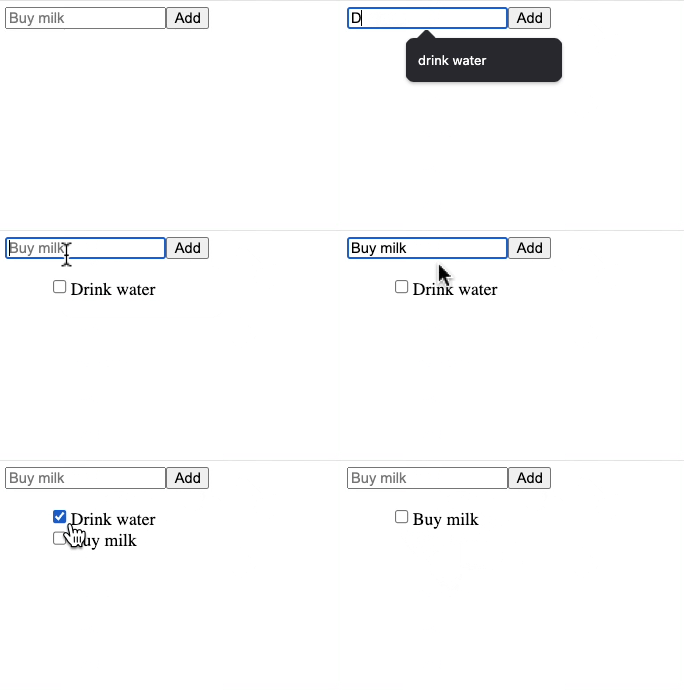
2. 单个 HTML 文件示例
Section titled “2. 单个 HTML 文件示例”以下是在单个 .html 文件中使用自定义元素的示例。
<!doctype html><html lang="en">  <head>    <title>WC Base Test</title>    <script type="module">      import { WebComponent } from 'https://esm.sh/web-component-base@latest'
      class HelloWorld extends WebComponent {        static props = {          myName: 'World',        }        get template() {          return `<h1>Hello ${this.props.myName}!</h1>`        }      }
      customElements.define('hello-world', HelloWorld)    </script>  </head>  <body>    <hello-world my-name="Ayo"></hello-world>    <script>      const helloWorld = document.querySelector('hello-world')      setTimeout(() => {        helloWorld.props.myName = 'Ayo zzzZzzz'      }, 2500)    </script>  </body></html>
3. 功能演示
Section titled “3. 功能演示”一些针对特定功能的演示: