Mga Halimbawa
Live demo gallery
Seksyong pinamagatang “Live demo gallery”Ang bawat halimbawa sa ibaba ay tumatakbo bilang standalone page sa demo.webcomponent.io ↗, isang live gallery na may source katabi ng bawat demo.
| Demo | Ipinapakita |
|---|---|
| Boolean props ↗ | presence/absence reflection, toggleAttribute, [flag] selectors |
| Custom attribute converters ↗ | toAttribute/fromAttribute para sa Date at array props |
| Props blueprint ↗ | static props bilang iisang source ng defaults at types |
| Prop type enforcement ↗ | static strictProps at ang log-not-throw default |
| Compile-time prop types ↗ | pag-type ng this.props sa TypeScript |
| Typed props ↗ | attribute round-trips na nagpapanumbalik ng declared type |
| Templating ↗ | string kumpara sa html tagged-template rendering |
| Render reconciliation ↗ | in-place patching na nagpapanatili ng focus, caret, at input state |
| Style objects ↗ | calculated at conditional styles gamit ang style prop |
| Shadow DOM ↗ | static shadowRootInit |
| Constructable styles ↗ | static styles, kasama ang pagsasama ng ilang sheet |
| Lifecycle order ↗ | bawat hook na naka-log habang tumatakbo |
| Attribute lifecycle ↗ | kung paano dinadala ng attribute changes ang mga hooks |
| onChanges payload ↗ | camelCase property kumpara sa kebab-case attribute |
| Just the parts ↗ | paggamit ng html/createElement nang walang base class |
| Kitchen sink ↗ | ilang feature na pinagsama |
| Single-file pen ↗ | counter at toggle sa iisang HTML file |
Mga halimbawa sa CodePen
Seksyong pinamagatang “Mga halimbawa sa CodePen”1. To-Do App
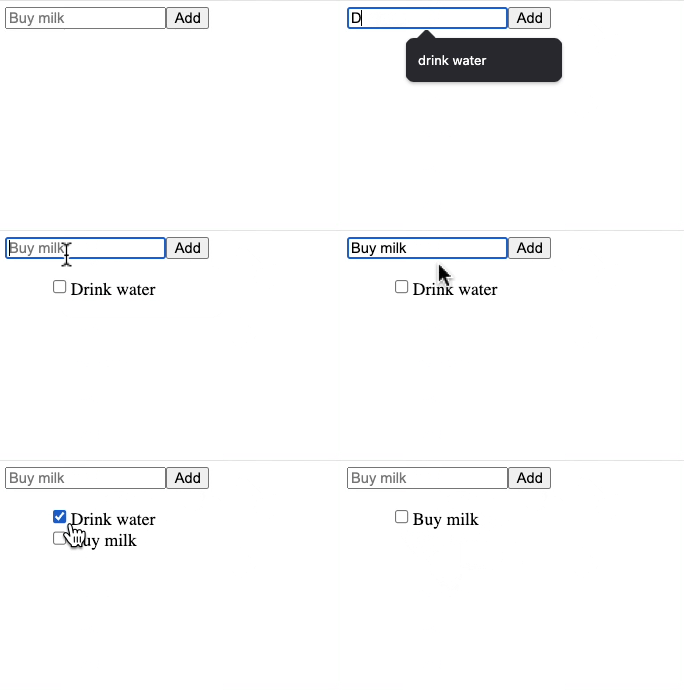
Seksyong pinamagatang “1. To-Do App”Isang simpleng app na nagpapahintulot ng pagdagdag / pagtapos ng mga gawain: Tingnan sa CodePen ↗
2. Halimbawa ng Single HTML File
Seksyong pinamagatang “2. Halimbawa ng Single HTML File”Narito ang isang halimbawa ng paggamit ng custom element sa iisang .html file.
<!doctype html><html lang="en">  <head>    <title>WC Base Test</title>    <script type="module">      import { WebComponent } from 'https://esm.sh/web-component-base@latest'
      class HelloWorld extends WebComponent {        static props = {          myName: 'World',        }        get template() {          return `<h1>Hello ${this.props.myName}!</h1>`        }      }
      customElements.define('hello-world', HelloWorld)    </script>  </head>  <body>    <hello-world my-name="Ayo"></hello-world>    <script>      const helloWorld = document.querySelector('hello-world')      setTimeout(() => {        helloWorld.props.myName = 'Ayo zzzZzzz'      }, 2500)    </script>  </body></html>
3. Mga Feature Demo
Seksyong pinamagatang “3. Mga Feature Demo”Ilang feature-specific na demo: