サンプル
ライブデモギャラリー
Section titled “ライブデモギャラリー”以下の各サンプルは、demo.webcomponent.io ↗上で単体のページとして動作します。ここは各デモとそのソースを並べて見られるライブギャラリーです。
| デモ | 内容 |
|---|---|
| Boolean props ↗ | 有無による反映、toggleAttribute、[flag] セレクター |
| カスタム属性コンバーター ↗ | Dateと配列propのためのtoAttribute/fromAttribute |
| Propsブループリント ↗ | デフォルト値と型の単一の情報源としてのstatic props |
| Prop型の強制 ↗ | static strictPropsと、デフォルトのログ出力(例外を投げない)動作 |
| コンパイル時のprop型 ↗ | TypeScriptでのthis.propsの型付け |
| 型付きprops ↗ | 宣言された型を復元する属性のラウンドトリップ |
| テンプレート化 ↗ | 文字列 vs html タグ付きテンプレートのレンダリング |
| レンダリング調整 ↗ | フォーカス、キャレット、入力状態を保持するインプレースパッチ |
| スタイルオブジェクト ↗ | style propによる計算・条件付きスタイル |
| Shadow DOM ↗ | static shadowRootInit |
| Constructableスタイル ↗ | static styles、複数シートの合成を含む |
| ライフサイクルの順序 ↗ | 発火するたびにログされる各フック |
| 属性のライフサイクル ↗ | 属性の変更がどのようにフックを駆動するか |
| onChangesのペイロード ↗ | camelCaseのpropertyとkebab-caseのattribute |
| 部分だけを使う ↗ | ベースクラスを使わずにhtml/createElementを使う |
| Kitchen sink ↗ | 複数の機能を組み合わせたもの |
| 単一ファイルのpen ↗ | 1つのHTMLファイルにカウンターとトグル |
CodePenの例
Section titled “CodePenの例”1. Todoアプリ
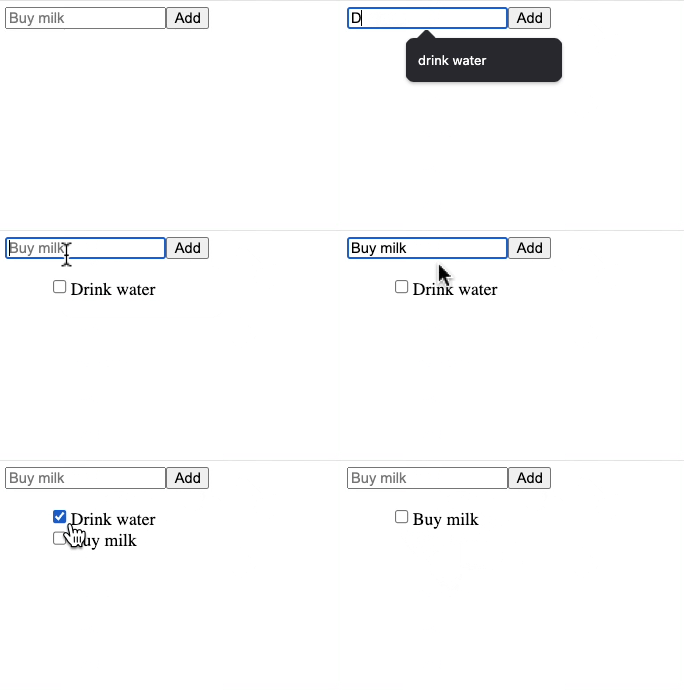
Section titled “1. Todoアプリ”タスクの追加・完了ができるシンプルなアプリです。 CodePenで見る ↗
2. 単一HTMLファイルの例
Section titled “2. 単一HTMLファイルの例”1つの.htmlファイル内でカスタム要素を使う例です。
<!doctype html><html lang="en">  <head>    <title>WC Base Test</title>    <script type="module">      import { WebComponent } from 'https://esm.sh/web-component-base@latest'
      class HelloWorld extends WebComponent {        static props = {          myName: 'World',        }        get template() {          return `<h1>Hello ${this.props.myName}!</h1>`        }      }
      customElements.define('hello-world', HelloWorld)    </script>  </head>  <body>    <hello-world my-name="Ayo"></hello-world>    <script>      const helloWorld = document.querySelector('hello-world')      setTimeout(() => {        helloWorld.props.myName = 'Ayo zzzZzzz'      }, 2500)    </script>  </body></html>
3. 機能別デモ
Section titled “3. 機能別デモ”いくつかの機能に特化したデモです。